

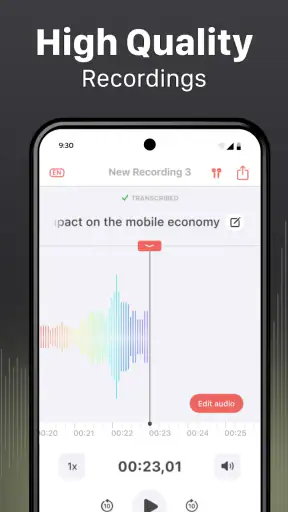
I came to Voice Recorder & Transcriber expecting a straightforward recording tool, but its real appeal is the way it keeps spoken notes and written transcripts together. That makes it more useful than a basic recorder when I need to remember what was said, turn a quick idea into editable text, or export material for use elsewhere. My overall view is positive: this is a practical productivity app for people who regularly work with spoken information, although it is not automatically the best choice for every recording situation.
The app is free to install and is suitable for everyone, which makes it easy to try without committing money first. It comes from Rhythmix OU and has reached more than a million installs, with a 4.5 average from roughly 8,800 ratings. Those figures suggest that it has found a broad audience, but they do not replace personal testing. What matters to me is whether the workflow is quick enough when I am busy, whether the transcript is genuinely useful, and whether exporting the result feels less troublesome than doing the work manually.
Why the recording-and-transcription combination matters
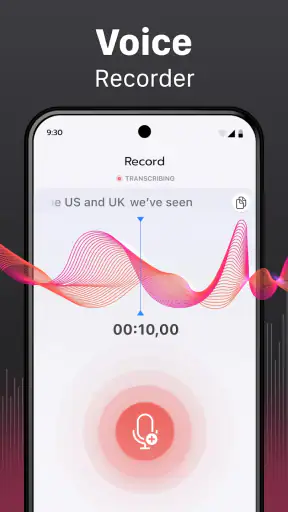
A normal voice recorder solves only the first part of a common problem: capturing sound. The difficult part often comes later, when I need to locate one detail inside a long recording or convert spoken thoughts into something I can edit. This app addresses both stages by combining voice recording, speech transcription, text editing, and export in one place.
That combination is particularly helpful for short, information-heavy moments. I can imagine using it after a conversation with a client, during a personal brainstorming session, or while walking when typing would be inconvenient. Instead of recording now and promising myself that I will organize everything later, I can work from the transcript while the subject is still fresh.
The distinction from a conventional recorder is important. A basic alternative may be perfectly adequate when I only need an audio file for later listening. Voice Recorder & Transcriber becomes more compelling when the written version is part of the final result. In that situation, the recording acts as a reference and the transcript becomes the working document.
A practical workflow for everyday notes
My preferred way to use this kind of app is to give each recording a clear purpose before starting. For example, instead of making one long file called “ideas,” I would create separate recordings for a project outline, questions for a meeting, and reminders for the next morning. That simple habit makes the later editing stage much easier, regardless of how accurate the first transcription is.
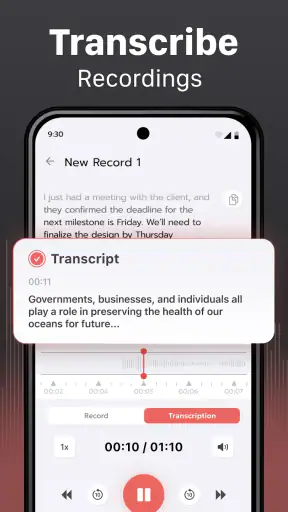
A useful workflow is to record naturally, review the generated text, correct the important phrases, and then export only after the transcript reflects what I actually want to keep. I would not treat automatic transcription as a finished document without checking it. Names, specialist vocabulary, background noise, and fast speech can all make a rough transcript less dependable than the audio itself.
The strongest reason to choose this app is the connected workflow, not recording alone. The ability to move from voice to text and then edit the result reduces the number of separate tools involved. That is a small convenience for a single note, but it becomes meaningful when I repeat the process several times a week.
Where it fits into study and work
Students may find it useful for capturing personal explanations, revision ideas, or spoken summaries before turning them into organized notes. I would still use it as a support tool rather than a replacement for careful study. A transcript can preserve the raw material, but I would need to restructure it into headings, questions, and conclusions before considering it ready for revision.
For work, the most sensible use is as a first draft. A researcher could record observations in the field, a freelancer could capture an interview outline, and a manager could dictate action points immediately after a discussion. The editing step matters here because a transcript may preserve words without preserving the hierarchy of decisions. I would mark deadlines, owners, and unresolved questions manually before sharing anything.
There is also a quieter use case: thinking out loud. Some ideas arrive faster through speech than typing. Recording them lets me follow the thought without interrupting it to correct spelling or formatting. The transcript then provides a searchable-looking text draft that I can trim into a message, outline, or checklist. For this purpose, imperfect wording is acceptable because the goal is to capture momentum first and polish later.
Editing is more valuable than it first appears
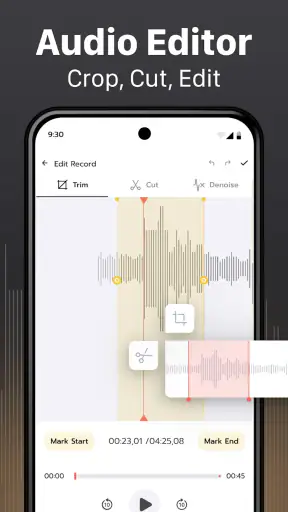
The text-editing part changes the app from a passive storage space into a preparation tool. I can treat the transcript as raw material rather than an untouchable record. That is useful when spoken language contains repetitions, half-finished sentences, or side comments that make sense aloud but look distracting on a page.
I recommend separating the review into two passes. First, I would correct factual errors that could change the meaning, such as names, figures, locations, and technical terms. Second, I would improve readability by removing repeated phrases and grouping related thoughts. Trying to perfect every sentence immediately is slower and makes it harder to notice the important mistakes.
One non-obvious advantage of keeping the audio alongside the text is that I can use the recording to resolve uncertainty instead of guessing from the transcript. If a sentence looks strange, the sound is the authority. This is especially useful in interviews or personal notes where a single misunderstood word can alter the conclusion. The app is therefore most trustworthy when I treat transcription as an editable draft backed by the original voice.
Export changes who can benefit from it
Export support matters because notes rarely stay inside the app. I may need to move a cleaned-up transcript into a document, send it to a colleague, or keep a copy with other project materials. The value is not simply having an export button; it is being able to complete the capture-to-use process without retyping everything.
I would still check the exported result before relying on it. A document that looks acceptable inside an editor may need small formatting adjustments elsewhere. For a short memo, that is a minor inconvenience. For a long interview or a detailed set of notes, I would reserve time for a final proofread and make sure the audio remains available as a reference.
This is also where the app compares favorably with the usual alternatives. Using a recorder plus a separate transcription service can create extra steps, duplicated files, and confusion about which version is current. Using a notes app alone may be faster for typed material but less natural for spoken thoughts. Voice Recorder & Transcriber sits between those options, favoring people who want one continuous path from speech to editable text.
Limitations I would consider before installing
The biggest limitation is that transcription should never be assumed to be flawless. The app can save time, but it does not remove the need for listening and correction. If the recording contains several speakers, overlapping conversation, strong background noise, unusual names, or specialized terminology, I would be especially cautious before treating the text as an accurate record.
That limitation affects the type of work I would trust it with. It is well suited to drafts, reminders, personal reflections, and material that I will review myself. I would be more hesitant to use an unedited transcript as an official meeting record, a legal statement, or a publication-ready interview. In those cases, the recording remains essential and human verification is not optional.
There is also a trade-off between convenience and control. A dedicated recorder may offer a simpler experience for people who care only about capturing audio, while a specialized transcription solution may be better for users who need advanced handling of lengthy professional recordings. This app’s strength is balance: it brings several useful stages together, but users seeking a highly specialized tool may prefer a narrower product.
The free entry point is welcome, though the app includes in-app purchases ranging from $2.99 to $34.99 per item. I would therefore install it first and test the workflow on the kind of recordings I actually make before paying for anything. The right value depends on frequency of use. Someone who records one occasional reminder may have no reason to spend more, while someone who repeatedly converts speech into working documents may find paid options worthwhile.
The current version is 1.6.1, and the app requires at least OS 9. That makes compatibility worth checking before installation, particularly on an older device. I would also keep expectations realistic about mobile editing. Even when the transcript is good, correcting a long document on a phone can be tiring. For substantial projects, I would use the app to capture and prepare the material, then continue the final editing in a larger writing environment after export.
A realistic day-to-day example
Imagine I leave a planning meeting with three decisions, several loose ideas, and one unclear responsibility. On the way home, I record a spoken recap while the details are still fresh. Later, I review the transcript, correct the names and key wording, remove the conversational filler, and turn the result into a short action list. I keep the audio because it preserves context, while the edited text becomes the version I can actually use.
That scenario shows both the benefit and the necessary discipline. The app saves me from reconstructing the meeting from memory, but it does not decide which statements are commitments and which are speculation. I still need to interpret the content. Its role is to make capture and first-pass organization faster, not to replace judgment.
Another useful approach is to record a question before researching it. I can speak freely, let the transcript collect the initial thoughts, and then edit the text into a research brief. This works better than trying to compose a polished prompt while ideas are still forming. The important tip is to leave a short pause between topics; clearer segments are easier to review than one uninterrupted stream of thoughts.
Who should use it, and who should skip it
I would recommend the app to students, writers, journalists working on early drafts, busy professionals, and anyone who thinks more comfortably by speaking. It is also a sensible option for people who want an accessible way to preserve spoken notes and then refine them into text. The combination is most valuable when recording and writing are part of the same task.
I would be less enthusiastic for someone who only wants a simple audio archive. If the transcript and editing tools will never be used, a basic recorder may feel more direct. I would also point users with strict professional transcription requirements toward a specialist service or a workflow with dedicated review controls. The app can support serious work, but I would not confuse convenience with guaranteed editorial accuracy.
People who frequently work offline, handle confidential conversations, or need a precise understanding of how their recordings are processed should make those considerations part of the decision before adopting any transcription tool. I would avoid recording sensitive material casually and would review the app’s current permissions and privacy information in the store before using it for private discussions. That is good practice here because voice recordings can contain more personal information than ordinary typed notes.
My final assessment
Voice Recorder & Transcriber succeeds because it recognizes that recording is often only the beginning. Its useful contribution is the bridge from spoken input to editable, exportable text. In my experience, that makes it more practical than a recorder that leaves all organization for later, while remaining less specialized than tools built solely for professional transcription.
I like it best as a fast capture tool and a first-draft assistant. I would use it to preserve ideas, summarize conversations, prepare notes, and create text that I can check before sharing. I would not use an unchecked transcript as a final authority, and I would not choose it solely for audio recording when a simpler option would do.
With a free starting point, an Everyone age rating, and a focused productivity purpose, it is easy to test whether the workflow suits you. Rhythmix OU has made a practical app for turning speech into something more usable. My recommendation is clear: try it if your daily problem is converting spoken thoughts into organized text, but keep the original audio and plan on reviewing important transcripts.


